


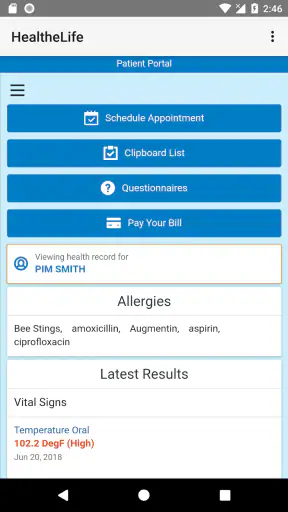
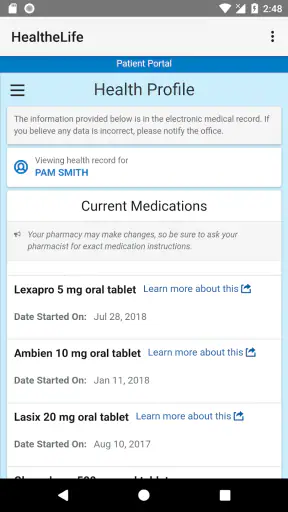
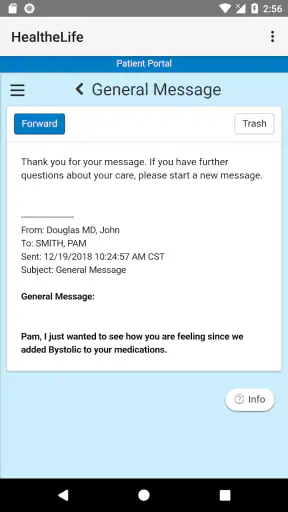
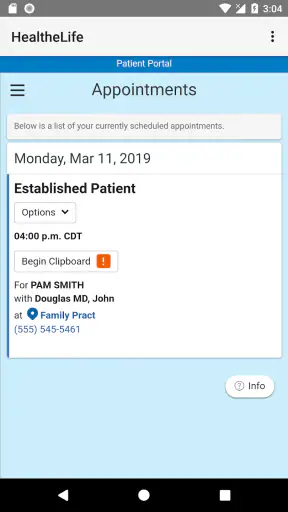
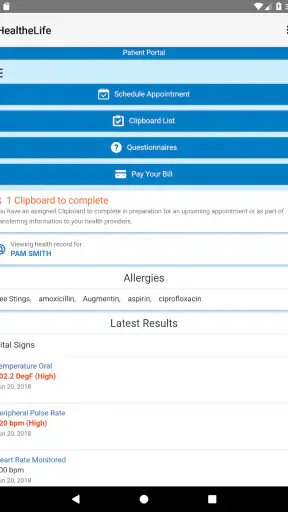
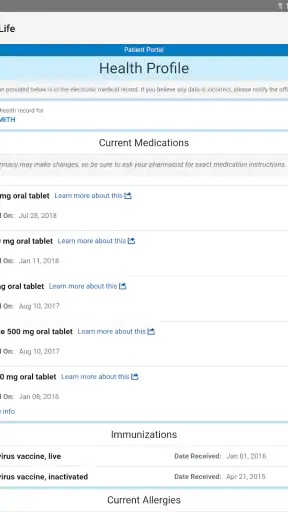

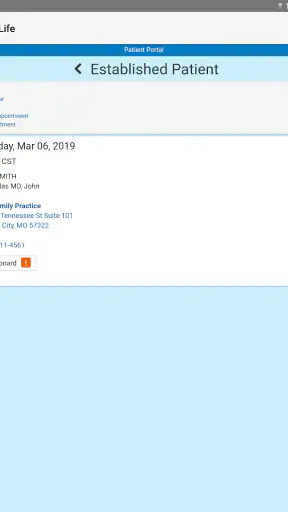
Managing healthcare online sounds simple until appointments, test results, messages, and medication details are scattered across different places. HealtheLife, a free medical app from Cerner Corporation, is built around bringing that routine contact with your care provider into one mobile space. I found its most useful idea to be the patient portal itself: instead of treating a phone as a replacement for a clinic, it gives me a more convenient way to reach the information and conversations my healthcare organization has chosen to make available online.
That distinction matters. HealtheLife is most valuable as a connected patient-access tool, not as an independent medical adviser. It does not turn a phone into a doctor, and I would not use it to judge an emergency or replace professional care. Its strength is quieter and more practical: checking information when I need it, staying organized between visits, and reducing the number of small administrative tasks that otherwise require a call or a paper reminder.
Putting the patient portal in everyday use
When I open HealtheLife, I approach it as a place for managing my relationship with a healthcare provider online. The experience depends heavily on whether the relevant organization supports the service and how much of its patient portal it has enabled. That is an important first step for anyone considering the app: installing it alone does not guarantee that every medical detail will appear. The useful question is whether my clinic, hospital, or care network connects its patient services through HealtheLife.
Once that connection is in place, the app makes more sense than a collection of unrelated health tools. A fitness tracker may focus on steps, sleep, or exercise. A symptom diary may help me record how I feel. HealtheLife serves a different purpose by giving me a patient-facing route into healthcare administration and communication. I use it when I want to review something connected to an actual care relationship rather than generate a general wellness score.
The app’s medical category is therefore a good fit, but it also sets the right expectations. This is not an app I would download simply to browse health advice. Its value appears when there is a real appointment, a real provider, or a real piece of personal health information to manage. For a person who already handles care through a participating organization, that focus can make the app feel more useful than a broad health platform filled with features I may never touch.
In my experience, the best way to use it is with a small task in mind. I might open it before a visit to check what information I need to have ready, after a visit to review what has been posted, or later in the week when I want to revisit a conversation rather than rely on memory. That simple habit changes the app from something I occasionally launch into a practical record of my healthcare interactions.
What the central capability changes
The main benefit of online health management is not merely speed. It changes when I can handle routine questions. A phone call usually requires me to find the right number, wait for office hours, explain the situation to someone else, and remember the answer. A patient portal can move some of that work into a written, self-directed process. That is especially helpful for details that are easy to forget, such as instructions connected with a recent visit or the wording of a message.
I also like the possibility of reviewing information at my own pace. Medical conversations can be stressful, and it is common to remember the broad conclusion while losing smaller details. Having a digital place to return to can reduce that pressure. It does not eliminate the need to ask questions, but it gives me a better starting point for those questions because I can look back at what is already available.
There is a useful trade-off here. A portal can make information easier to reach, but it can also make me responsible for noticing updates and following through. The app is not a personal assistant that automatically understands what matters most to me. I still need to read carefully, keep track of next steps, and contact the healthcare organization when something is unclear. That extra responsibility is manageable, but users expecting the app to interpret every entry for them may find the experience less reassuring.
How I would use it before and after a visit
Before an appointment, I would use HealtheLife as a preparation tool rather than waiting until I am sitting in the examination room to remember everything. I can make a short list of topics I want to raise, review the information already associated with my care, and think about changes since the last visit. Even when the app does not answer a question directly, seeing the available record can help me ask a more precise one.
Afterward, I would return to it for follow-through. I might check whether the information from the encounter is available, review a message, or confirm what I need to remember. The practical insight is that the app works best when I treat it as a timeline for small actions, not as a place I visit only when something feels wrong. Opening it at the right moment can prevent a minor uncertainty from becoming a forgotten task.
For a family member helping another adult, the same workflow can be useful, but I would be careful about privacy and account access. I would not assume that another person should use my account or that shared access is automatically appropriate. Healthcare information is personal, so I would follow the organization’s own process for any authorized assistance instead of improvising with a shared phone or password.
A realistic day-to-day scenario
Imagine that I have just left a clinic visit and remember only part of the conversation. On the way home, I know there was a detail I wanted to check, but calling immediately may not be convenient. Later, I open HealtheLife and review the information that has been made available through my provider. If the answer is there, I can settle the question without another call. If it is not, I have a clearer description of what I need to ask.
The hidden advantage in that situation is not a dramatic medical feature. It is the reduction of friction between remembering a question and acting on it. I can handle the administrative part when it suits me, while keeping the clinical decision with the healthcare professional. That separation is healthy: the app helps me organize communication, but it does not encourage me to treat a digital entry as a diagnosis.
Another useful scenario is preparing for a conversation with a new clinician inside the same care relationship. I can use the information available in the portal to refresh my memory before explaining what has happened recently. This may save time and reduce the chance that I leave out a detail simply because the appointment feels rushed. I still need to describe symptoms in my own words, but the app can support a more organized conversation.
Where the experience can become frustrating
The biggest limitation is that HealtheLife’s usefulness is tied to the healthcare organization behind it. If my provider does not use the relevant system, or if only part of its portal is connected, the app may feel sparse even though the installation itself went smoothly. This is not the kind of app where a larger feature set can compensate for a missing provider connection. Before making it central to my routine, I would verify that my healthcare organization supports it.
That dependence also affects consistency. Different organizations may present different parts of the patient experience, so one person may find the app comprehensive while another sees a narrower set of tools. I would avoid judging the app only by what appears on a friend’s phone. The account relationship and the provider’s setup play a major role in what I can actually do.
There is also a mental burden to consider. Having health information close at hand can be reassuring, but it can encourage repeated checking. I would use the app to support a care plan, not to refresh it compulsively whenever I feel anxious. If a symptom is urgent, a portal is not the right channel for waiting on a response. In that situation, I would use the appropriate emergency or clinical contact recommended by my healthcare provider.
Ease of access does not automatically mean ease of understanding. Medical language can remain difficult even when it is displayed clearly on a phone. I would treat HealtheLife as a source of access and documentation, then ask a clinician to explain anything that affects a decision. The app is strongest when it helps me bring the right question to the right professional.
How it compares with familiar alternatives
Compared with calling a clinic for every routine question, HealtheLife can be more convenient because I can review available information without coordinating a live conversation. Written access also gives me something to revisit, which is useful when memory is unreliable after a stressful appointment. The phone remains better when an issue is complicated, urgent, or too sensitive to explain through a portal message.
Compared with a general health app, HealtheLife is narrower but more directly connected to care administration. A wellness app may be better for habits, exercise tracking, or broad educational content. HealtheLife is the better fit when my goal is to manage information linked to a healthcare provider. I would not choose it as my main tool for lifestyle coaching, and I would not expect a lifestyle app to replace this kind of patient access.
Compared with paper notes, the app can be easier to consult when I am away from home and less likely to disappear in a drawer. Paper can still be useful for writing down questions during a consultation or keeping a backup of information I personally need. My preferred approach would be to use HealtheLife for the connected record and my own notes for observations, reminders, and questions I want to raise next time.
Compared with a standalone medical-record organizer, the important difference is the relationship with the provider. A personal organizer may give me more control over information I enter myself, while HealtheLife is useful because it can present information through the healthcare organization’s patient service. The choice depends on whether I need a private log of my own observations or a practical route into an existing care system.
Small habits that make it more useful
I would begin by checking the account connection carefully and making sure I am using the correct patient profile. That sounds basic, but it prevents a common mistake: assuming that an empty or incomplete view means there is no information anywhere. The first useful step is confirming the relationship with the provider, then learning where the app places the parts of the portal I expect to use.
I would also open the app with a specific purpose and leave with a specific next action. For example, if I review information after an appointment, I might write down one question that still needs clarification. If I read a message, I would decide whether it requires a reply, a call, or no action. This keeps the portal from becoming a passive archive and turns it into a simple follow-up system.
A third habit is to avoid interpreting isolated medical terms on my own. I can use the app to locate information and prepare questions, but I would not make a treatment change based only on something I read there. That is a meaningful trade-off: the convenience of immediate access is valuable, yet the responsibility to understand context remains with me and my care team.
Finally, I would keep my phone’s general security in mind. Because the app concerns personal medical information, I would use the device protections available to me and avoid leaving the account open where another person could casually view it. This is not a feature claim about the app; it is simply sensible behavior for any mobile patient portal.
Who will benefit most
HealtheLife is a strong choice for people whose healthcare organization supports it and who want fewer routine calls. It should appeal to anyone who likes reviewing information in writing, preparing for appointments, or keeping track of follow-up tasks from a phone. It can also help people who manage several visits over time and want a single familiar place to begin looking for connected information.
It may be especially practical for someone who often remembers questions after leaving an appointment. Instead of relying on memory or waiting until the next visit, that person can use the portal as a starting point for reviewing what is available and deciding how to follow up. The app does not remove uncertainty, but it can make uncertainty more organized and actionable.
I would be more cautious about recommending it to someone looking for symptom diagnosis, emergency guidance, medication coaching, or a broad wellness program. Those needs call for different tools or direct professional support. I would also not make it my first choice if my provider does not participate, because the central benefit depends on that connection.
The app has been available since October 2015, and its current version is 102.0.31, with support beginning at Android 9. That makes checking device compatibility part of the practical decision, particularly on an older phone. It is rated for Everyone, free to use, and has passed one million installs, while its average rating sits at 3.4 from around 2.7 thousand ratings. Those figures suggest a widely used but mixed experience, which matches my view: the concept is useful, but the quality of the experience can depend on the healthcare organization and the user’s expectations.
My final view after using it
HealtheLife succeeds when I judge it as a patient portal companion rather than a complete health platform. Its most important capability is giving me a more flexible way to manage healthcare information and routine communication online. That can save time, improve preparation, and make follow-up feel less scattered, especially after an appointment when details are easy to forget.
At the same time, I would not install it expecting a universal medical dashboard that works the same for everyone. The provider connection matters, the available information may vary, and the app cannot replace urgent care or professional interpretation. Those limits are not deal-breakers; they simply define the right role for the tool.
My recommendation is straightforward: if my healthcare organization supports HealtheLife and I want convenient access to its patient services, I would give it a try. I would use it deliberately, protect the account, and treat every entry as a starting point for informed communication rather than a substitute for a clinician. For that specific job, this free app from Cerner Corporation is a sensible option, even if people seeking broader wellness features should look elsewhere.


